

AI that passes inspection.
AI agents, apps and automated review systems for businesses, municipalities and architects.
20 years of accessibility and regulatory consulting. 2,500+ assets audited across four countries.
What we build
-
Custom AI agents
ציוןיועץ נגישות דיגיטלי
מהו הרוחב המזערי הנדרש בכבש נגיש?
בבניין ציבורי חדש או קיים?
חדש
הרוחב החופשי של פני הכבש לא יהיה קטן מ-130 ס"מ.
ת״י 1918 חלק 3.1, סעיף 2.6.2
MaziPersonal assistant
I drafted an email to “Sample Business” with the quote. Send it?
Subject: Updated quote · PDF attached
YesNo
Yes
Sent: quote 1042 · Sample Business · ₪3,510 · link
Example, in Hebrew: Zion asks whether the building is new or existing, then answers that the clear width of a ramp in a new public building must be at least 130 cm, citing IS 1918 Part 3.1, clause 2.6.2. Below it, Mazi shows an email, sends it after a “yes” and returns a receipt. An agent that is expert in your field, answers with its source and leaves the decision to you.

Zion: a digital accessibility consultant. Knows the law, the regulations and IS 1918, and cites the clause.

Mazi: a personal assistant in your email, calendar, Drive and CRM. Sends only after your “yes”.
In pilot
What both of them do
- Answer on WhatsApp, in Hebrew.
- Ask when a detail is missing, instead of guessing.
- Show what they relied on: a clause in the standard, or a receipt with a link.
- Stay inside their job, and say they are AI.
-
Tailored apps and business systems
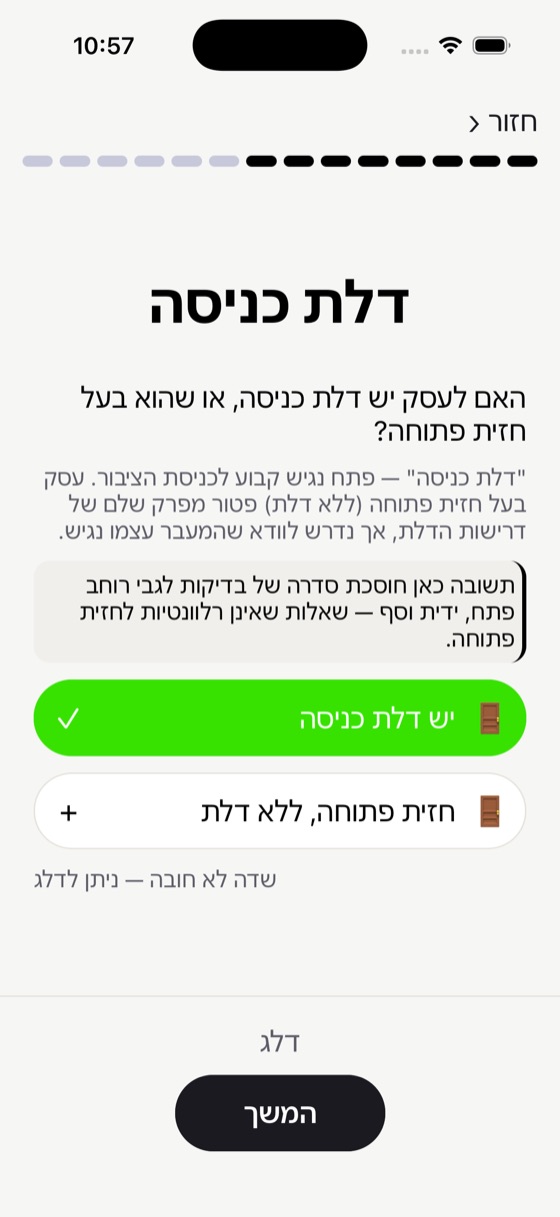
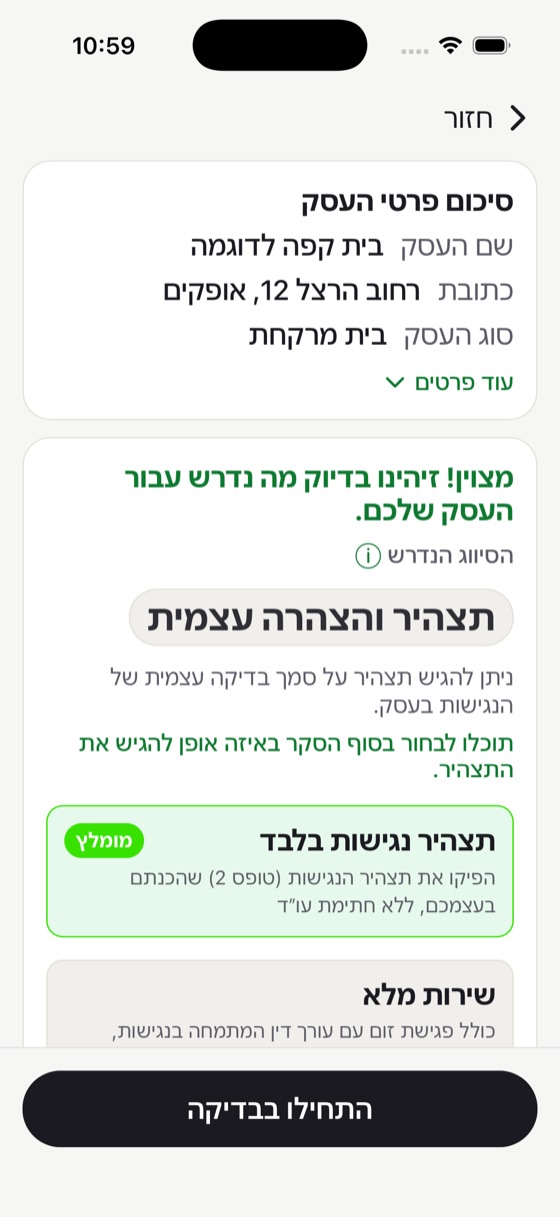
Screenshots from the Esek Nagish app, in Hebrew Native iPhone and Android apps, and back-office systems that connect to your tools.
Esek Nagish: an accessibility check for a business licence, from the phone.
A-Check: on-site accessibility surveys, through to a full audit report.
A CRM for an accessibility consultancy: from lead to invoice, with most steps running by themselves.
Example: what the CRM does by itself from lead to invoice, and an AI chat that answers from the CRM and the mailbox, with its source. In the CRM, from lead to invoice
- A lead arrives from the website questionnaireAutomatic
- AI flags a duplicate lead, and the company number is checked in the registryAI
- The quote becomes a branded PDF, in HebrewAutomatic
- The client signs on their phoneClient
- A project, tasks and a Drive folder openAutomatic
- A payment request with a card link, and email reminders until it is paid, when switched onAutomatic
- The tax invoice goes out by itselfAutomatic
AI chat inside the CRM
What did we agree with Sample Business on price?
10% off the survey. The updated quote went out on 3 October.
Source: the “Quote” email thread
Connected to:
- Card payments
- Invoicing
- Gmail
- Drive
- Contacts
-
Plan review
In development76 cm · 80 required 112 cm · passes Storage · exemptIllustration: a Revit floor plan with Arch-Check's markings. The door between the lobby and the meeting room is too narrow (76 cm, 80 required), the main entrance passes (112 cm), and the storage closet is exempt. Checks against fixed rules from the standard, inside Revit, before a violation costs money on site.
Arch-Check for Revit: checks door widths in the model, and shows each door with one click.
Arch-Check for PDF: the same check on a PDF plan, without Revit.
-
Automated website audits
In developmentOn screen
The screen reader said
“button”
AI judge:The button has no name. Add
aria-label="Search"Example: a search button shown on screen as a magnifying glass. Three layers: the code, the rendered page and a real screen reader. AI turns the findings into fix guidance.
Website-checker: records what a blind user hears on your site.
How we work
A half-hour call
We'll tell you honestly whether AI helps.
Scope and quote
A timeline and a price, before anyone writes code.
Build and hand-over
In stages you can try, up to a system that meets the standard.
AI tools we recommend
English interfaces. Next to each tool: how it handles Hebrew.
Video
Voice
 ElevenLabsStrong Hebrew speech
 Murf AIHebrew narration
Writing & SEO
 WritesonicWrites in Hebrew
 Surfer SEOAnalyses Hebrew content
 JasperWrites in Hebrew
 Copy.aiWrites in Hebrew
Work
 NotionWrites and organises in Hebrew




Got a process that could run smarter?
Tell us what's eating your time. We'll answer honestly, even if you don't need AI.